Point of sale: selling, receipts and the Z report
A fast barcode till — every shift ends with a Z report and an accounting entry.
The point of sale is available for the “Retail shops” sector and supermarkets (chosen in “Company setup” together with the “Shop type”).
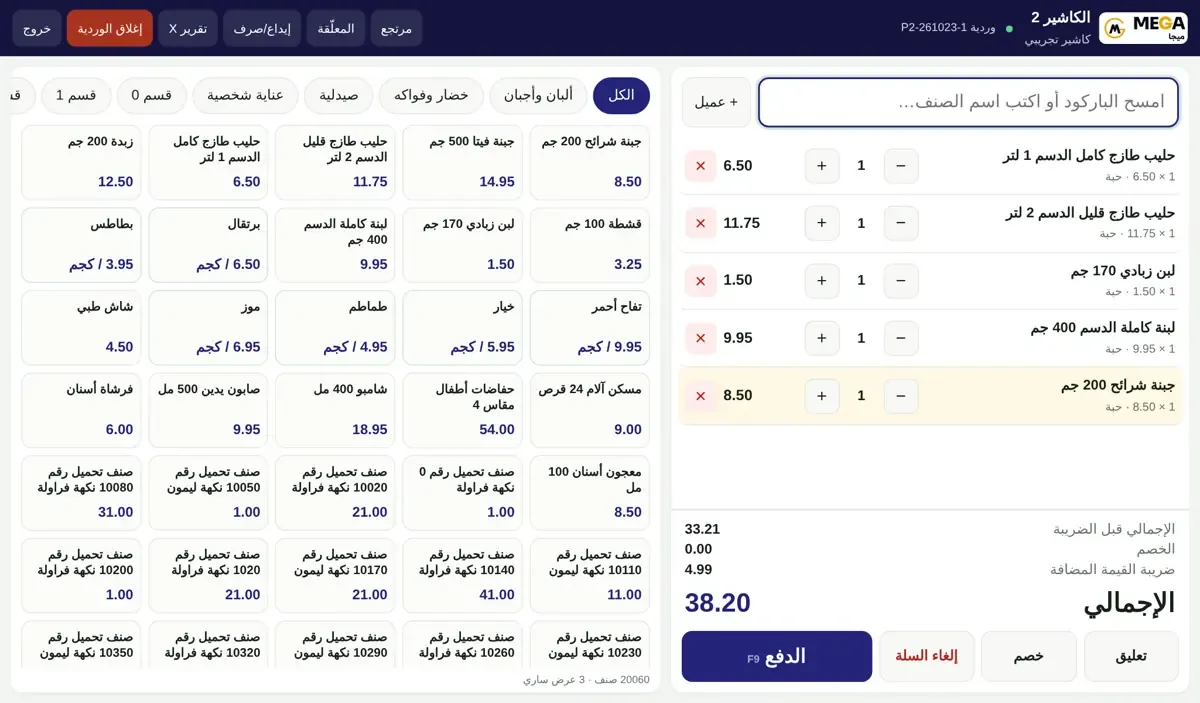
The cashier
The cashier signs in and “Point of sale” opens directly; the first time they pick the register and enter the opening float to open the shift.
Scan a barcode, type an item name or tap an item card; scale barcodes read weight and price automatically.
Change quantity with + and −, delete a line with ×. “+ Customer” links the sale to a customer’s mobile number.
Cart buttons: “Hold” to finish later, “Discount”, “Void cart” and “Pay” (F9).
At payment: cash (change is calculated), card with the transaction number, or split; the simplified tax invoice then prints with the ZATCA QR and verification code (80 mm receipt printers).
Top menu: Return, Held carts, Cash in/out, X report, and Close shift with a cash count.
Management and the Z report
From the portal open “Point of sale” (management): the “Today” tab shows sales, cash, card, number of invoices, returns and open shifts.
“Shifts” tab: each shift’s float, expected, counted and difference.
“Daily Z report” tab: pick the day and register → “Show”: sales, returns, net, VAT, discounts, cash and card, and a “By cashier” section, then “Print”.
Admin tabs: registers, cashiers and PINs, audit log, and settings such as discount limits, negative stock, scale barcodes and return period.
Screenshots come from a demo copy with sample data.
Was this article helpful?
What could be better? (optional)
We only store vote counts — no personal data.