The Egypt edition: EGP, 14% VAT, Egyptian invoices and Form 41
The same MEGA with Egypt’s rules: EGP, 14% and Form 41.
Setup
Open “Company setup” from the home page; at the “Company country” step choose “Arab Republic of Egypt”, then “Save”.
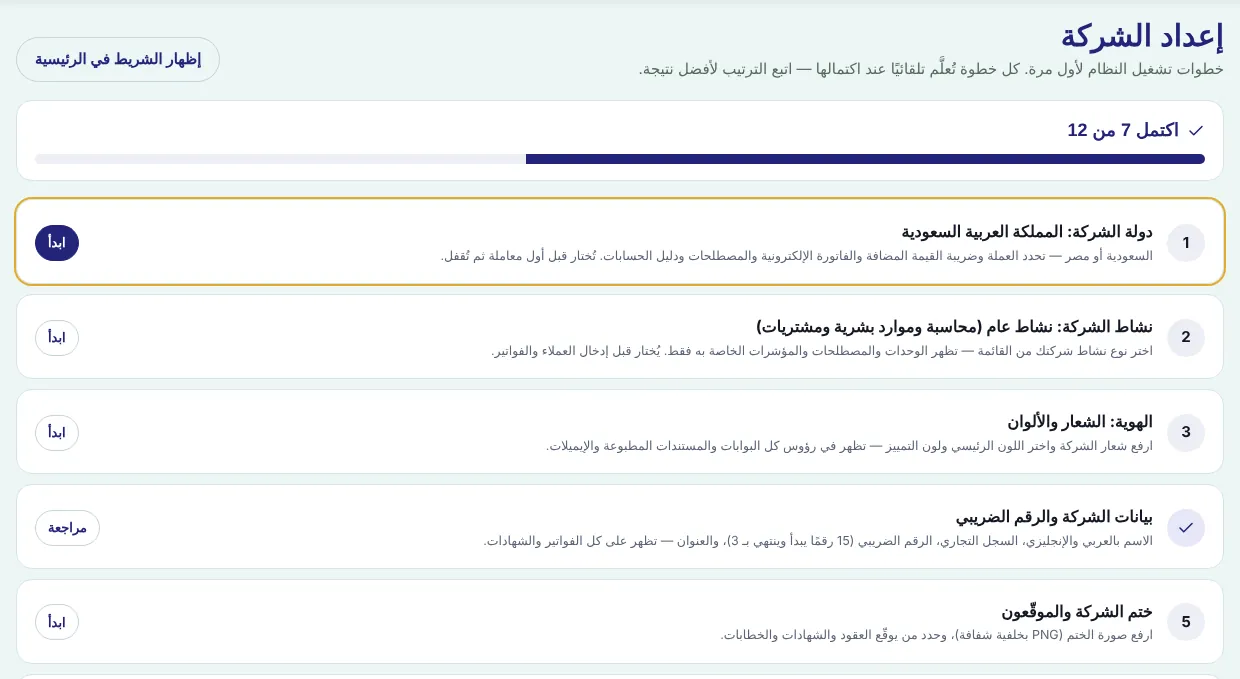
The system switches at once: Egyptian pound, 14% VAT, amounts in words in pounds and piastres, and a Friday weekend.
Under “Company details and tax registration”: Arabic and English name, tax registration number (9 digits), commercial register, activity code, address and branch.
Egypt settings: the invoice cancellation window (7 days by default), the national-ID threshold for individuals, and the tax regime (standard or simplified).
Invoices
- Each line has a tax category: standard 14%, contracting & construction (per the table and supply date), production-line machinery 5%, zero-rated export, or exempt.
- An invoice to an individual above EGP 50,000 needs the 14-digit national ID; without it MEGA rejects the invoice.
- The invoice is titled “Tax Invoice” with Egyptian wording and both parties’ tax registration numbers.
- Within the window, cancelling is an actual cancellation (status change); after it, a credit note is issued.
Withholding tax and Form 41
- Withholding is deducted automatically from supplier payments by transaction type (1% supplies and contracting, 3% services, 5% commissions) above EGP 300.
- Amounts your customers withhold from you are recorded as a receivable from the authority.
- Admin hub → “Accounting” → “Egypt taxes”, pick the quarter: “Form 41 — what we withheld from suppliers”, “Taxes withheld by customers” and deadlines, then “Printable Form 41” or Excel.
Monthly return and corporate tax
“Accounting” → “Reports” → “VAT return”, pick the month: sales by category, purchases and net VAT payable (due by the end of the following month). At year end: 22.5% corporate tax under the standard regime, or the simplified regime.
Screenshots come from a demo copy with sample data.
Was this article helpful?
What could be better? (optional)
We only store vote counts — no personal data.